
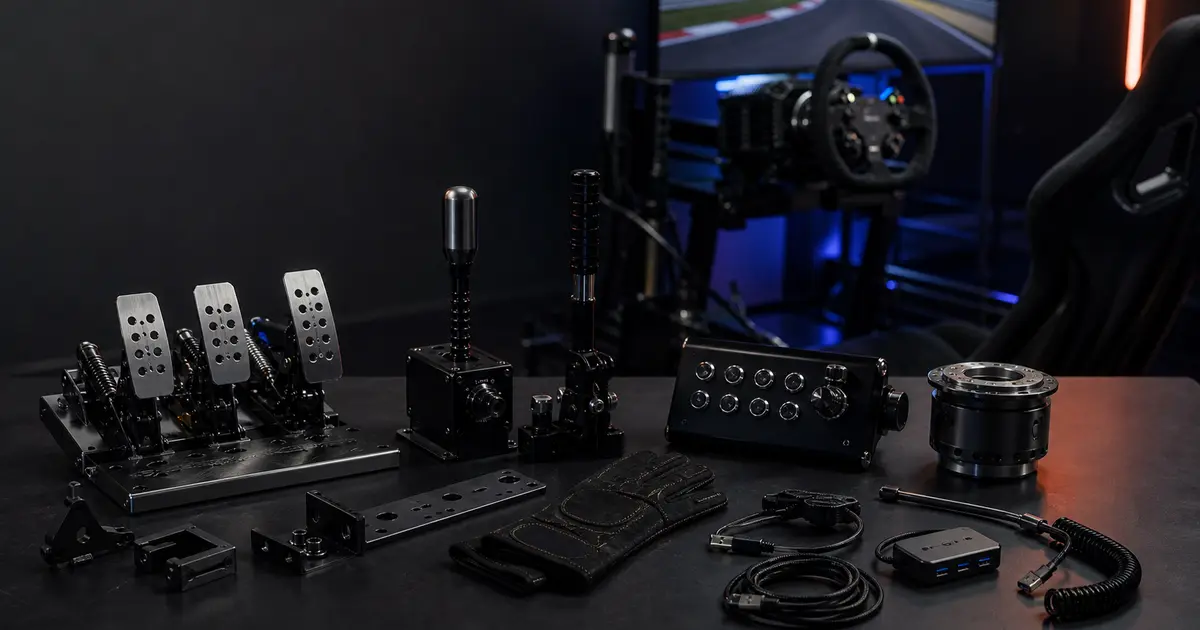

If you've just strapped yourself into a wheel-and-pedal bundle and started wondering "what now?" — this guide on must have sim racing accessories walks you through every worthwhile add-on, ranked by real impact and budget, so you spend money on upgrades that matter and skip the gear that gathers dust. Whether you're a newcomer duct-taping a wheel to a desk or an enthusiast building out a full motion cockpit, the 25+ accessories below cover the full spectrum: core controls, immersion and haptics, comfort, cockpit mounting, and software. The upgrade roadmap flows in that exact order — start with what moves lap times, then layer in what makes the experience richer.
What Counts as a Sim Racing Accessory (and What's Just Hype)
Not every peripheral sold in a sim racing store earns a place on your rig. A useful framework divides add-ons into three buckets: lap-time tools (load-cell pedals, button boxes, quick releases), immersion builders (haptics, motion, triples, VR), and comfort/ergonomics (seats, gloves, cooling fans). The first bucket has a direct, measurable return. The second bucket makes the hobby more engaging but won't shave tenths on its own. The third bucket matters more than most beginners expect — after hour three of a stint, a cheap chair becomes the real enemy of pace.
What's genuinely hype? A camera. One of the reddit community put it bluntly: "How is a camera an essential accessory in sim racing? Is there anyone left not trying to be an 'influencer'? I've been sim racing for nearly 15 years and have bought most gadgets imaginable… Never considered buying a camera." [boxthislap.org] That's the honest filter: ask whether the accessory changes how the car feels, how long you can drive, or how quickly you can react. If the answer is no, deprioritise it.
Core Control Accessories (Biggest Performance Impact)
This section covers the hardware that directly connects your inputs to the simulation. These are the upgrades with the highest ROI — often the difference between consistent lap times and frustrating inconsistency.
Load-Cell Pedals / Pedal Upgrades

The single highest-impact upgrade for most sim racers is load-cell brake pedals. Stock potentiometer pedals measure travel distance; load-cell pedals measure force. In real cars, you brake by pressing hard, not by moving your foot a specific distance — so load cells are fundamentally more realistic and more consistent. Once you've braked on a quality load-cell set (Fanatec Clubsport V3, Heusinkveld Sprint, Moza CRP2), going back feels like braking through cotton wool.
The single upgrade I'd tell every new racer to make first is load-cell pedals — not a better wheel, not a seat, not haptics. I tested the shift from Logitech G pedals to a Fanatec CSL Elite load-cell brake and my braking consistency in iRacing improved visibly within two sessions. You stop guessing where the bite point is and start feeling it.
Budget load-cell options now start around $120–150 (Moza CRP2 base unit, Asetek Invicta), while mid-range sets like the Fanatec Clubsport V3 sit around $250–300. High-end hydraulic sets (Heusinkveld Ultimate+) push past $700 but are used by real racing drivers for training. Entry-level load-cell kits from Thrustmaster (T-LCM) are available for under $180 and represent a massive step up from rubber-cone brakes.
Hydraulic Handbrake
For rally and drift disciplines, a hydraulic handbrake isn't a luxury — it's essential. A hydraulic unit uses real fluid pressure to simulate the weighted, progressive feel of a real car's handbrake. The Fanatec CSL Handbrake (~$80), Heusinkveld Handbrake (~$350), and Moza HBP (~$130) are the most common picks. The stability of the mount matters as much as the unit itself: a floppy handbrake connected via a zip-tied bracket is almost worse than none. Dedicate a proper mount (covered in the cockpit section) to avoid torque flex ruining your inputs.
Even if you primarily race circuit, a handbrake opens a huge range of content: WRC titles, Dirt Rally 2.0, BeamNG, Assetto Corsa drift servers. It's one of the most versatile add-ons on this list.
Sequential and H-Pattern Shifters
A sequential shifter (push-pull lever) replicates the feel of motorsport-spec gearboxes used in GT cars, touring cars, and Formula vehicles. A H-pattern shifter handles the classic gate-shift feel of road cars and older race machines. The most important question before buying: which games do you primarily run? AC, ACC, and Automobilista 2 reward both types heavily. If you live in ETS 2 (and many serious sim racers do, for relaxation), an H-pattern with 6 or 8 gears makes the whole experience dramatically more immersive and actually reduces cognitive load on long hauls.
Budget options: Thrustmaster TH8A (~$70 used), Logitech Driving Force Shifter (~$40). Mid-range: Fanatec Clubsport Shifter SQ V1.5 (~$160). High-end: Precision Sim Engineering H-Pattern (~$400+). A sequential and H-pattern combo like the Fanatec unit (switchable) is the most practical single purchase if you race multiple disciplines.
Button Box and USB Hub

A button box moves in-game functions — fuel mix, DRS, brake bias, pit limiter, headlights — off the keyboard and onto dedicated physical switches within thumb reach. In a race, fumbling for F5 on a keyboard costs time and breaks immersion. In ETS 2 specifically, a multi-page button box lets you manage multiple trailer functions without ever touching the keyboard.
DIY button boxes using an Arduino Leonardo and a 3D-printed enclosure cost as little as $20–40 in parts. Prebuilt units from Leo Bodnar or Simline start around $60–80. A USB hub mounted to the rig itself is equally important: it reduces cable chaos and avoids USB dropout issues that plague complex setups — a 7-port powered USB 3.0 hub (~$20–30) is one of the cheapest quality-of-life improvements on this list.
Quick Release (QR) and Wheel-Side Adapters
A quick release lets you swap steering wheels in seconds without tools. This matters when you own multiple wheels (e.g., an open-wheel rim for single-seaters and a GT rim for endurance racing), but it also adds a premium feel to daily use — the satisfying click of snapping a wheel on is a small but genuine pleasure. The NRG Short Hub + quick release combo (~$60–90) works with most bases. Higher-end magnetic QRs from Simucube, Fanatec (QR2), and Asetek offer zero-play coupling for direct drive wheelbases where any flex is felt directly through force feedback.
Immersion and Haptics — Feeling the Track
Once your controls are dialled in, this section is where sim racing becomes genuinely visceral. These upgrades don't necessarily improve lap times, but they dramatically improve how long you want to keep racing.
Bass Shakers and Tactile Transducers

A bass shaker (also called a tactile transducer) is a motor attached to your seat or rig frame that converts audio signals into physical vibration. With SimHub driving the output, you can feel individual kerb hits, tyre lock-ups, engine RPM, road texture, and gear shifts through your body rather than just hearing them. The most widely used units are the Buttkicker Gamer 2 (~$100) and Dayton Audio BST-1 (~$50 per unit). Multiple transducers stacked — one under the seat, one on the pedal plate — create a layered tactile map of what the car is doing.
I was sceptical about haptics until I set up two Dayton BST-1 units via SimHub and drove Monza in AC. The moment I locked the rear brakes into the Lesmo chicane and felt it through my seat before I even saw the car move on screen — that was it. Haptics don't improve lap times, but they communicate tyre state in a way that eventually becomes intuitive.
The Reddit community backs this up. As one r/simracing user noted in a thread on accessories that improve the experience: "Simagic haptics are great but you need the control box — one box supports up to 3 haptics units." [reddit.com/r/simracing/comments/1r8gkno] This is a practical detail often missed in product listings: the control box is a separate purchase (~$80) but enables a full multi-point haptic network off a single SimHub connection.
Motion Platforms
Motion platforms simulate g-forces and road feel by physically tilting and heaving the seat. In 2026, affordable 2-DOF and 3-DOF motion kits have matured considerably — units like the Next Level Racing Motion Platform V3 (~$700–900) and SFX-100 DIY builds (~$400–600 in parts) are accessible to serious enthusiasts without requiring a $10,000 DOF Reality rig. SimHub now natively drives several motion platforms, reducing the software friction that previously made entry difficult.
The honest caveat: motion introduces noise (actuators are loud), requires space (your rig footprint grows), and may need recalibration game-to-game. It's the highest-cost, highest-reward accessory in the immersion category — and one to research heavily before buying.
Wind Simulators
A wind simulator (SimXperience Aura, DIY fan arrays) blows air at you proportionally to your in-game speed. It sounds gimmicky until you try it: the deceleration sensation when lifting off at 180 mph and the fan speed drops creates a speed reference your body actually reads. Budget entry point: two 120mm PC case fans pointed at your face through a mounting bracket — total cost under $15. Dedicated units like the SimXperience SimVibe wind kit run $80–150.
RGB / LED Eyebrows and Ambient Lighting

Rev-indicator LED strips ("eyebrows") mounted at the top of your monitor arc flash shift lights in-game colours to keep your eyes on the road rather than a digital RPM gauge. Apex Sim Racing sells prebuilt RGB eyebrow kits specifically profiled for sim racing (~$40–60). Philips Hue Play bars mounted behind the monitor create ambient bias lighting that reacts to on-screen colour — this genuinely reduces eye strain on long sessions.
Triple Monitors vs. VR Headset
This is the biggest fork in the immersion upgrade path. Triple monitors offer a wide physical field of view, sharp resolution, no headset fatigue, and easy use of SimHub overlays. A budget triple setup (three 24" 1080p monitors + triple stand) starts around $400–600 total. The immersive, fully-surrounding FOV however belongs to VR headsets — the Meta Quest 3 (~$500) and PlayStation VR2 offer genuinely close-cockpit immersion that no flat screen can replicate. The tradeoff: VR demands more GPU, can cause fatigue on long stints, and makes it harder to grab a drink mid-race.
For a complete breakdown of how to set up and optimise a triple-screen sim rig, see the SimRacingBeast triple screen sim racing setup guide.
Comfort and Ergonomics for Long Stints
Spending four hours in a bad seat or without ventilation isn't just uncomfortable — it degrades concentration and lap-time consistency in the final hour of any race. These accessories are often bought last and regretted for being bought last.
Racing seat: A proper bucket seat (Sparco R100, OMP WRC-R) positions your body correctly relative to the wheel and pedals — hips low, arms slightly bent, feet flat on the pedal plate. Sim-specific seats from Next Level Racing and GT Omega are bolted directly to cockpit frame rails. Prices range from $150 (entry sim seat) to $400+ (real motorsport bucket). For a detailed guide on choosing the right sim racing seat for your setup, the SimRacingBeast sim racing seat guide covers fitting, materials, and frame compatibility thoroughly.
Sim racing gloves: With direct drive wheelbases producing 15–25 Nm of torque, ungloved hands blister and lose grip over long sessions. Alpinestars Tech-1 K gloves (~€30) or basic OMP karting gloves work well. Thin material is better than thick for feel.
Sim racing boots/socks: The community is split. Dedicated sim boots (Sparco Hyperdrive, ~€70) give consistent pedal feel and grip. Many pros have moved back to thin sim-specific socks (Asetek SimSports, ~€30) for maximum pedal feedback. Either beats bare feet on load-cell pedals.
Headset: For audio positioning (hearing approaching cars, tyre squeal, engine note), closed-back gaming headsets work well. The SteelSeries Arctis 1 at ~€89 is a clean entry-level pick with console and PC compatibility. The Logitech G733 (~€109) adds wireless convenience for rigs where a cable would stretch awkwardly.
Cooling fans: A 20cm clip-on desk fan (~€10–15) aimed at your face makes a measurable difference in a summer session. For cockpit builds, two 140mm Noctua fans mounted to the rig frame create near-silent airflow. Fatigue drops noticeably.
Seat cushion / lumbar support: OMP and Sparco sell universal seat cushions (~€25–40) that add padding and lumbar curve to rigid bucket seats. If you race for more than two hours at a stretch, this is one of the cheapest quality-of-life investments on this list.
Sim Rig and Cockpit Accessories (Mounting and Stability)
Sim rig accessories aren't glamorous, but a wobbly setup undermines every other upgrade. If your wheel flex is absorbing force feedback and your monitor is vibrating with every curb strike, you've wasted money on the expensive stuff.
Wheel mount / desk clamp: For desk racers, a proper wheel clamp (Playseat Challenge clamp, GT Omega clamp, ~$30–50) stops the wheel sliding under hard cornering. Dedicated cockpit rigs (GT Omega Apex, Next Level Racing GT Track, ~$300–600) solve this entirely.
Monitor mount: A single articulating arm (~$30) or dedicated triple monitor stand (~$100–200) positions screens at correct eye height and angle, and frees up desk space. Monitor position affects perceived FOV as much as the monitor size itself.
Keyboard tray: The Logitech K400 Plus (~$35) wireless touchpad keyboard mounts neatly to cockpit frame with a simple 3D-printed bracket, giving full PC access without leaving the rig. This sounds minor until you've reached across your desk mid-briefing ten times in one session.
Cup holder: A $10–15 bolt-on cup holder (most cockpit brands sell universal versions) keeps drinks within reach. This is laughed at until the first three-hour race where dehydration becomes real.
Glove holder: A small hook or velcro strap on the rig frame keeps gloves accessible between sessions. The r/simracing community specifically called this out: "QR wheel mount, headphone mount, speaker mounts, USB-hub mount, cup holder, glove holder, angle mount — these small things make such a difference once your main rig is sorted." [reddit.com/r/simracing/comments/17pthkn]
Headphone and speaker mounts: Cockpit-mounted headphone hangers (~$10) and small satellite speaker brackets ($15–25) keep cables managed and audio gear safe between sessions.
Dedicated shifter and handbrake mounts: The stability point raised by gamergeardirect and simhub.pro deserves emphasis: a shifter mounted to a generic clamp will torque-twist under hard sequential pulls. Dedicated frame-rail mounts (available from Sim-Lab, Next Level Racing, Trak Racer for $30–80) are worth every cent. Flex in mounting = inconsistent shift feel = missed shifts under pressure.
Bezel-free kit: For triple-monitor setups, a bezel-free lens kit (specifically for edge-matched adjacent monitors) reduces the thick black borders where screens meet, creating a near-seamless visual panorama. Asus and third-party vendors sell these for $40–80 for a three-screen set.
Angle mount / monitor angle adapter: Curved monitor arrays for triples require angle mounts (~$20–40) to cant each outer screen correctly toward your eye position. Without correct angling, side screens feel oddly flat and the FOV benefit is wasted.
Software and Data Accessories

This is the most underrated category in the entire guide. The right software transforms raw data into racecraft improvement at near-zero hardware cost.
SimHub: Free (donationware) software that reads telemetry from almost every major sim title and outputs to Arduino-based dashes, LED strips, tactile motors, motion platforms, and custom overlays. SimHub is effectively the operating system of the accessory ecosystem — most tactile, haptic, LED, and motion accessories depend on it for game integration. In 2026, SimHub's game support and plugin library have matured to the point where nearly every mainstream title is supported out of the box.
Custom dash displays: A 4–7" secondary screen running a SimHub-driven dashboard (fuel level, tyre temps, lap delta, traction control status) keeps critical data in peripheral vision without cluttering your main screen. Cheap Android tablets on USB (~$40–60) or dedicated units from Simucube/Simagic (~$150–300) both work via SimHub.
Telemetry overlays: Apps like Motec i2 Pro (free for sim use), VRS Telemetry (~$10/month), and Trackmap overlay (SimHub plugin, free) overlay sector times, braking points, and car data on screen in real time. These aren't accessories in the hardware sense, but they are the fastest path to actual lap-time improvement for data-literate racers.
Lap timer apps: SimHub's built-in lap delta, Crew Chief (free, voice-over engineer), and RaceLabApps (subscription, $5–10/month) extend your data capability without spending a cent on hardware.
Best Sim Racing Accessories Under $80
Budget-constrained racers shouldn't feel locked out of meaningful upgrades. These picks deliver disproportionate value.
| Accessory | Approximate Price | Primary Benefit |
|---|---|---|
| Powered 7-port USB hub | $20–30 | Eliminates USB dropout; clean cable routing |
| Dayton BST-1 bass shaker | $45–55 | Tactile kerb/lock-up feedback via SimHub |
| Logitech K400 Plus keyboard | $30–35 | Full PC control without leaving the rig |
| Cup holder (rig-mount) | $10–15 | Comfort; reduces distraction |
| Budget button box (DIY Arduino) | $20–40 | Physical in-race controls |
| Sim racing gloves (Alpinestars) | $25–35 | Grip and blister prevention on DD wheels |
| Bezel-free kit (triple monitors) | $40–80 | Near-seamless screen join for triples |
| Clip-on cooling fan | $10–20 | Fatigue reduction on long sessions |
| Headphone/speaker rig mount | $10–15 | Cable management, safe storage |
| SimHub + Arduio dash (DIY) | $30–50 | Live telemetry on secondary screen |
The best sim racing accessories don't always require a large budget — a $50 Dayton bass shaker with SimHub can deliver more tangible feedback than spending $200 on a fancier wheelbase, particularly at entry-level force-feedback tiers.
Best Sim Racing Accessories 2026 — What's New and Worth It
Several categories have matured significantly, making 2026 a genuinely good year to buy.
Affordable direct drive wheelbases: As of 2026, entry-level direct drive units from Moza (R3, ~$250), Cammus (C5, ~$200), and Fanatec (CSL DD, ~$350) have brought belt-drive-killing FFQ performance to sub-$400 budgets. If you're still on a belt-drive base from 2019–2021, upgrading to entry DD is arguably the single best sim racing accessories 2026 purchase in the controls category.
Mainstream tactile haptics: SimHub's haptic profiles and the growing availability of affordable transducer kits mean you no longer need a $500 Buttkicker setup to get quality tactile feedback. Multi-transducer kits (seat + pedal plate) cost under $150 total in parts. As noted earlier, the Simagic haptics ecosystem added a dedicated control box that manages up to three units from a single connection — exactly the kind of ecosystem maturity that signals a category arriving.
Cheaper motion: The SFX-100 and similar Simtools-compatible actuator platforms have dropped in parts cost, and Next Level Racing's V3 motion platform has become more widely available. Combined with SimHub Motion integration, full motion is no longer a $5,000+ proposition.
SimHub maturity: SimHub version 9.x (2025–2026) added improved motion profiles, expanded game support (including the latest title updates for EA WRC, Le Mans Ultimate, and Rennsport), and a reworked dashboard editor. It remains the single best sim racing accessories 2026 investment in software — especially since it's free.
How to Prioritise — Your Upgrade Path
Don't buy everything at once. The upgrade path below is ordered by impact-per-dollar for the average sim racer moving from a first bundle toward a serious rig.
| Priority | Upgrade | Budget Range | Lap Time Impact | Immersion Impact |
|---|---|---|---|---|
| 1 | Load-cell pedals | $120–300 | ⭐⭐⭐⭐⭐ | ⭐⭐ |
| 2 | USB hub + cable management | $20–30 | ⭐ | ⭐⭐ |
| 3 | Button box (DIY or prebuilt) | $20–80 | ⭐⭐⭐ | ⭐⭐⭐ |
| 4 | Proper wheel/cockpit mount | $30–500 | ⭐⭐ | ⭐⭐⭐ |
| 5 | Bass shaker(s) via SimHub | $50–150 | ⭐⭐ | ⭐⭐⭐⭐ |
| 6 | Racing seat | $150–400 | ⭐⭐ | ⭐⭐⭐ |
| 7 | Sequential/H-pattern shifter | $50–300 | ⭐⭐⭐ | ⭐⭐⭐⭐ |
| 8 | Hydraulic handbrake (rally/drift) | $80–350 | ⭐⭐⭐⭐ | ⭐⭐⭐⭐ |
| 9 | Quick release + extra rim | $60–200 | ⭐ | ⭐⭐⭐ |
| 10 | Triple monitors or VR | $400–700 | ⭐⭐ | ⭐⭐⭐⭐⭐ |
| 11 | Motion platform | $400–1,000+ | ⭐⭐ | ⭐⭐⭐⭐⭐ |
| 12 | Wind simulator | $15–150 | ⭐ | ⭐⭐⭐ |
People constantly ask me whether to buy a motion platform or a better wheelbase next. My answer is almost always: sort your pedals and cockpit rigidity first. I've seen racers on $1,500 DD bases with stock potentiometer pedals getting demolished in consistency by guys on $80 Thrustmaster wheels with a $150 load-cell brake. Fix the inputs before buying the immersion.
Decision logic by budget:
- Under $100 total to spend: USB hub, button box parts, bass shaker (Dayton BST-1 + SimHub).
- $100–$300: Load-cell pedal upgrade — this is the single most important step.
- $300–$600: Cockpit/rig frame, shifter, proper seat.
- $600–$1,500: Hydraulic handbrake, triple monitors or VR entry, full SimHub haptic network.
- $1,500+: Motion platform, direct drive upgrade, bezel-free triples, wind simulator.
What the Community Actually Buys
Reddit's r/simracing community is a reliable sanity-check against marketing noise. When the question "what accessories does everyone should own?" was posed, the top-voted answer didn't list expensive hardware — it listed practical cockpit organisation gear: "QR wheel mount, headphone mount, speaker mounts, USB-hub mount, cup holder, glove holder, angle mount — these small things make such a difference once your main rig is sorted." [reddit.com/r/simracing/comments/17pthkn] The signal: once the core rig is in place, it's the $10–30 mounts, hangers, and organisers that make it a pleasure to use daily.
On the haptics front, a thread specifically on accessories that improve the experience flagged a technical nuance that product pages miss: "Simagic haptics are great but you need the control box — one box supports up to 3 haptics." [reddit.com/r/simracing/comments/1r8gkno] Buying transducers without accounting for the control box is a common mistake that leaves people with hardware they can't properly use.
The BoxThisLap comment section offered a useful reality check on the "influencer gear" category — the commenter who pointed out that a camera has never been on any serious sim racer's shopping list [boxthislap.org] is a reminder that the loudest voices in sim racing content are often optimising for content, not lap times. Prioritise gear that improves your driving experience, not your stream aesthetics.
FAQ
Load-cell pedals, without question. Braking is the single biggest variable between consistent and inconsistent lap times in any simulator. No other add-on improves your driving as directly or as quickly.
Not directly. What they do is give you earlier physical feedback about tyre state — locking brakes, losing rear traction, hitting kerbs — that, over time, becomes intuitive information your driving brain uses. Experienced haptics users often describe "feeling" tyre behaviour before they consciously process it. So: indirect improvement, yes; magic button, no.
Sequential, if you primarily race modern circuit cars (GT3, GT4, single-seaters, touring cars). H-pattern, if you race classic road cars, older GT machinery, or anything with a manual gearbox. Combination units (Fanatec Clubsport Shifter SQ V1.5, Thrustmaster TH8A) are the most flexible single purchase.
It depends on your GPU and comfort preferences. Triples offer sharpness, no headset fatigue, easy SimHub overlay integration, and work well for long endurance stints. VR delivers unmatched depth perception and car-interior immersion, and makes judging braking points feel more natural. If your PC can comfortably run VR, try it before committing to a triple stand.
A powered USB hub. It sounds boring, but it eliminates USB dropout issues that plague complex setups and costs almost nothing. Second pick: a $10 cup holder. Dehydration during a three-hour race is a genuine pace killer.
Yes — earlier than most people think. Flex in your cockpit transmits into your controls and your perception of force feedback. A rigid mount for your wheel and a proper shifter bracket pay dividends on every session.